Independent processing for transmit and receive audio.
Article / ESSB audio processing
ESSB & Behringer 2496
Source & technical researchJohn M. Anning · NU9N
The DEQ2496 combines equalization, dynamic control, downward expansion, limiting, and analysis in one processor—making it a flexible tool for shaping extended-SSB transmit audio.
This condensed field guide follows the initial-setup principles documented by NU9N. Treat the values as a starting point: microphone response, voice, transceiver bandwidth, gain staging, and other processors all affect the final result.
Read NU9N’s complete setup guide ↗Rear-panel MAX switch in for additional peak headroom.
Use the primary analog input path.
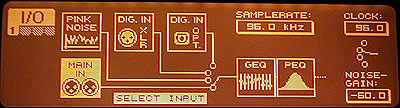
Set from I/O menu page one.
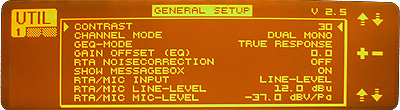
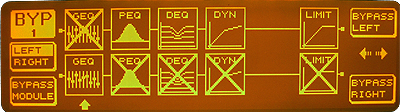
Utility, bypass, and I/O
Check the installed firmware before changing settings. NU9N identifies version 1.4 for original hardware and 2.5 for later version-two units. Set Channel Mode to Dual Mono, bypass unused modules, and establish the main input and clock configuration before EQ work begins.
Feed it clean audio
With the meter reading the input source, adjust the microphone preamp so normal speech is around −25 dB on the input peak meter; brief voice peaks approaching −10 dB are expected. Good gain staging preserves headroom before dynamic or equalization processing.
Dynamic EQ is not static EQ
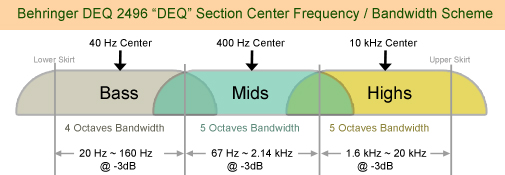
NU9N uses the three DEQ bands as amplitude-dependent control across broad frequency regions—functionally similar to multiband compression. Thresholds must be calibrated with the actual voice and level. Any upstream gain, EQ, or compression change requires those thresholds to be recalibrated.
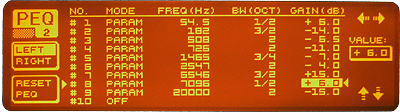
Build PEQ around the station
Parametric EQ settings depend on the microphone, voice, transmitter response, and occupied bandwidth. NU9N’s 6 kHz example is informative, not universal. Begin with other tone controls and compression neutral, avoid very narrow low-bass filters, then evaluate and adjust the complete transmitted audio chain.